Recently, I am using Tynker to program codes. Tynker will teach you how to program a code. Here are some blocks I used and how they work:
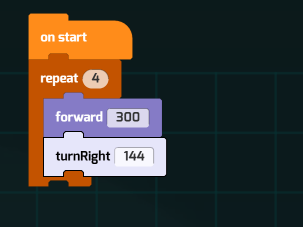
Repeat
The “repeat” block will repeat the block’s command as many times as you set it in the “repeat” block. You can use the “repeat” block , so you won’t have to drag a lot of blocks into the code.
Repeat until block
The “repeat until” block will repeat the block’s command until, it reaches what you wrote after, “repeat until”. It will stop repeating the code when it reaches what you wrote after, “repeat until”.

If then and Else
You will have to write something after the “if” block and also write something in the “else” block. For example, if you type “brick” in the “if” block, and you type “jump” after the “if” block. Then, you type “walk” in the “else” block, so when you click start, it will jump when the character see the brick. If else, it will walk.

Repeat forever
This block will repeat forever what you wrote in the “repeat forever” block. For example, if you write “walk” it the “repeat forever” block, it will be walking forever in the screen.

Walk
The walk block will let the character move forward. if you don’t want to drag a lot of walk blocks, you can use a “repeat” block.

Fly up
The “fly up” block will let your character move up.
