The Burning iPhone


A few years ago, my mom had a technical problem with her iPhone. Her iPhone started getting warmer and warmer. Finally, when it got to hot, we thought for a moment then, one of us said, ” Put it in the refrigerator!” So, we putted it in the refrigerator. About twenty minutes later, we took it out of the refrigerator. Even though it got cooler, but it was still warm. So, we left it out for a few minutes. After a few minutes passed, it got cool again.

Vocabulary Definition

Save-as VS. Save

“Save-as” lets you choose a file that you want to put your work in. “Save” will save your work into the last file that you opened.

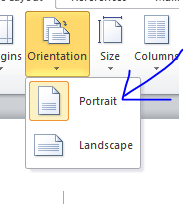
Orientation

Orientation is the format of your page, portrait- vertical and landscape- horizontal.

Portrait and Landscape

The difference between “portrait” and “landscape” is that one is vertical format and the other one a horizontal format. “Portrait” is a vertical format, and “landscape” is a horizontal format.

Back-up

“Back-up” means having another “just-in-case” copy of the original file. So, if something went wrong, you would have a copy of the original file.

The Invention of Computer Programming Language (Grace Hopper)

Summary

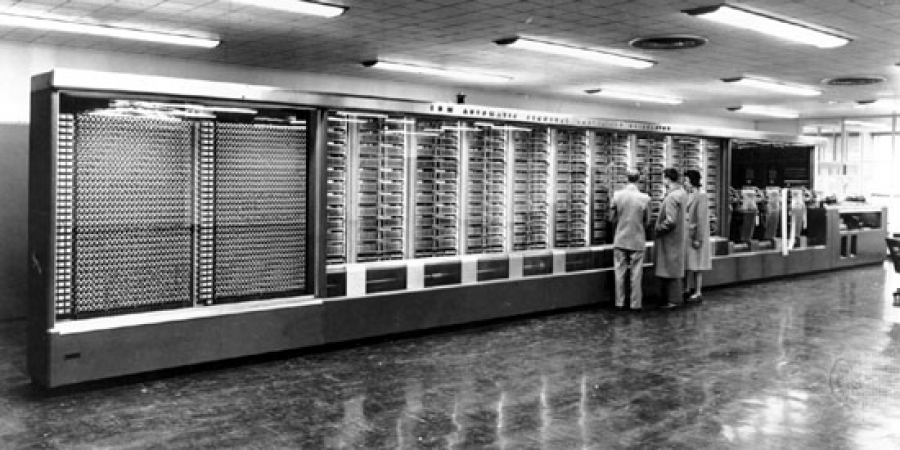
Grace Hopper was an United States Navy officer and an American Computer scientist. Grace started being Computer Scientist in 1944, and she was a Navy officer from 1943 to 1986. She was born on December 9th, 1906 in New York City, U.S.A. During her navy career, she met the Mark 1 Computer and, it made her started to think about the clocks she had taken apart during her childhood. So, she took the Mark 1 Computer apart part by part. Then, she noticed that inside the computer was just like a library. After a while, she figured out how to use easier or more human understandable languages to communicate with computers.

Grace Hopper in her U.S. Navy uniform.

Sadly, everyone did not believe in Grace. They thought it was impossible for computers to understand human language. Finally, in 1952 a senior gave Grace a chance to present her invention. So Grace took the chance and, presented the first computer program in the world. Which was called the A-0 compiler. Then, she made more versions of A-0, which are, A-1, A-2, A-3, and B-0. Which is the programing language, COBOL.

The Mark 1 Computer

Fun Facts

Did you know that the phrases “bug” and “debug” were made by Grace. Referring to computer errors. Did you know that Grace once had found a moth in her computer?! Then, she taped the moth inside her notebook! Did you know that 80% of businesses in the world uses COBOL? Fun fact: Grace had taken apart enough clock in her house at the age of 7 to know how clocks work!

How Does the Internet Work?

Here’s a list things I learned from this video:

  1. A Router’s duty is to deliver messages or things from one device to another device.

2. Every server has a unique IP address, like your house has an address. The IP address is for the Router to deliver the right message to the right device.

3. A set of protocols developed for the Router to get data from one network device to another is called TCP.

What is the Internet? This picture is about the internet. The internet is a network that connects millions of devices worldwide.

What is a Router? This image is about a Router. A Router’s duty is to deliver messages or things from one device to another device. The Router uses the IP address to deliver the right message to the right device. A set of protocols developed for the Router to get data from one network device to another is called TCP.

Inside a Computer

This video helped me learn more about what’s in a computer. This video talks about the CPU, what’s inside a mouse, and other things in the computer.

What does CPU stand for? What is its main job?

CPU stands for Central Processing Unit. A CPU is the brain of a computer. It doesn’t takes up the whole computer. Its main job is to fetch instructions from the computer’s memory, and executing them.

What two numbers does the CPU only understand?

The CPU only understand the numbers 1 and 0. Number 1 means “on”, and 0 means “off”.

What are two systems inside a mouse used for?

The two systems inside a mouse are used to send information to the basic input/output subsystem.

Programming with Tynker

Recently, I am using Tynker to program codes. Tynker will teach you how to program a code. Here are some blocks I used and how they work:

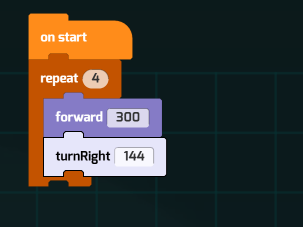
Repeat

The “repeat” block will repeat the block’s command as many times as you set it in the “repeat” block. You can use the “repeat” block , so you won’t have to drag a lot of blocks into the code.

Repeat until block

The “repeat until” block will repeat the block’s command until, it reaches what you wrote after, “repeat until”. It will stop repeating the code when it reaches what you wrote after, “repeat until”.

If then and Else

You will have to write something after the “if” block and also write something in the “else” block. For example, if you type “brick” in the “if” block, and you type “jump” after the “if” block. Then, you type “walk” in the “else” block, so when you click start, it will jump when the character see the brick. If else, it will walk.

Repeat forever

This block will repeat forever what you wrote in the “repeat forever” block. For example, if you write “walk” it the “repeat forever” block, it will be walking forever in the screen.

Walk

The walk block will let the character move forward. if you don’t want to drag a lot of walk blocks, you can use a “repeat” block.

Fly up

The “fly up” block will let your character move up.

dictionary

Online Dictionary for kids with Pictures will help you learn about things with pictures. But if you learn about a particular word you might not find

https://kidspicturedictionary.com/

Merriam-Webster will help you by putting the words in alphabetical order and when you click a word it will give you the definition of the word. But it does not have pictures if you want to know what it look like.

http://wordcentral.com/

Kids Words myth it will give you a subject and then tell you the words about the subject. But it can’t teach you a word if it is not about the subject.

https://kids.wordsmyth.net/we/

Google Docs will pop up some links to online dictionaries. MS Word will have the definition of the word.

Technology Solutions

Once, I was writing my online homework then suddenly I could not type anything. After a while of trying like clicking the enter button and clicking letters but it wouldn’t work then I asked for help. Then my dad and I tried to figure it out. At the end, I clicked the refresh button then I could type again!

Vocabulary

digital: sending information in 1 and 0.

delete and backspace : Delete will delete the letter that is in front your curser. Backspace will delete the letter behind your curser.

Preventing Careless Delete Actions in FileMaker

embed: inside a mass or material.

Portrait and Landscape: Portrait is tall and thinner. Landscape is shorter and fatter.

Save and save as: Save will just put it in the file. Save As will let you choose the file and name.